
How to Create Apple-like Retina Effect With jQuery
Apple has long applied a winning strategy in marketing – create well designed products, have a dedicated fan base, and let the hype build up before every product release. This is also the case with the latest version of their iPhone. One of the interesting stuf we can found on the latest iphone version is the term they coined – “Retina display” and the promo image accompanying it.
That’s why tutorialzine do litle experiment and writen tutorial “How to Create Apple-like Retina Effect” with only jQuery and CSS.
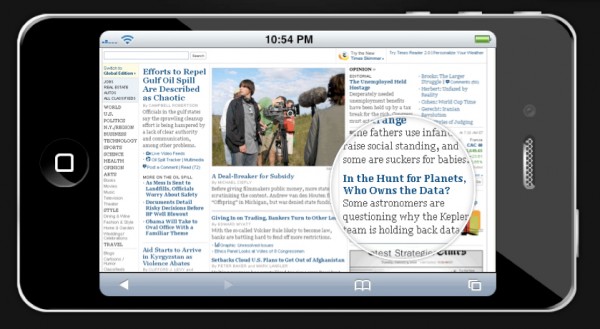
The screenshot is actually displayed at half its original size, as they are using the same image for both the small version (displayed in the iPhone) and big version, which is shown in the rounded tooltip. Lastly they have the retina div, which is rounded with CSS3 and displays the big version of the webpage screeshot as its background as it is moved around with the mouse.
Requirements: jQuery framework
Demo: http://demo.tutorialzine.com/2010/06/apple-like-retina-effect-jquery-css/demo.html
License: License Free

 0
0
 464
464