




Google like imageless buttons
This jQuery plugin is an attempt to recreate Google imageless buttons and prove that it doesn’t take a whole team of engineers and an endless cycle of code revision and quality control (their own words) to pull this off. This buttons automatically adapt to paddings and other styling you wish to use.
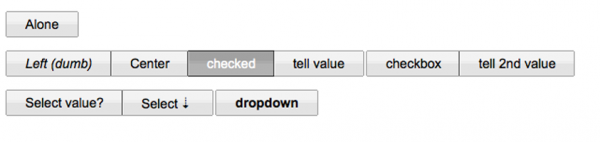
They allow for a lot of stylistic customizationn via a few lines of css while keeping all the display critical css rules hidden deep inside the plugin.
Supported browsers
- Opera 10 beta
- Opera 9.6x
- Firefox 3
- Firefox 2
- Safari 4
- Safari 3
- Internet Explorer 8 beta
- Internet Explorer 7
- Internet Explorer 6
- Chrome
- Adobe AIR 1.5+
There are two known issues on Internet Explorer though. On activated buttons the right darker border disappears and onchange events are not fired because they don’t work on noninput elements.
The buttons should be applicable on any element, although I’ve mostly tested with spans. Also, in order to preserve the semantic structure of your documents, all markup needed to render the buttons is nested inside the main element. To make a styled Button you basically just call the styledButton() function on it.
Requirements: JQuery framework
Demo:http://swizec.com/code/styledButton/
License: License Free

 0
0
 511
511







No comments
tripwire magazine | tripwire magazine
01.27.2010
[...] Google like imageless buttons [...]
95+ Fresh Community Posts for Web Designers and Developers | tripwire magazine
01.27.2010
[...] Google like imageless buttons [...]
95+ Fresh Community Posts for Web Designers and Developers | Afif Fattouh - Web Specialist
01.28.2010
[...] Google like imageless buttons [...]
There are no trackbacks to display at this time.